

MetaTrader 4 Demo Account: Practise trading without risking real capital — one of the best free ways to learn MetaTrader 4
Prepared by the Libertex team
Content reviewed internally in accordance with regulatory standards.
A MetaTrader 4 demo account is a useful tool for anyone planning to start trading or looking to develop existing strategies, as it allows you to practise trading risk-free under realistic market conditions. It enables risk-free trading because all trades are made with virtual capital and no real money is used. This allows both new market participants and experienced traders to explore the features of one of the world’s most widely used trading platforms in a realistic market environment. The virtual balance lets you test all key aspects of trading — from order execution and technical analysis to complex trading strategies.
Key takeaways:
- A MetaTrader 4 demo gives you access to the platform’s features without using real capital, making it one of the best MetaTrader options for beginners.
- New market participants and experienced traders can train their skills in a realistic market environment.
- The demo lets you test trading strategies based on technical indicators — as well as combinations of them — under realistic market conditions.
- You should only switch to live trading after thorough preparation.
What is an MT4 demo account and how does it work?
A virtual account can be compared to a flight simulator for traders. The platform replicates real-time trading conditions using authentic market data, while traders work with virtual funds. This means all price movements, spreads and market conditions match what the real, live environment looks like, which allows you to practise trading risk-free without having to use real money.
The demo provides access to the full MetaTrader functionality, including all charting tools, technical indicators and order types. Traders can test various instruments for forex trading, CFDs on commodities, indices and other assets.
Key benefits of a MetaTrader 4 demo account:
- Full access to all trading tools and the best MetaTrader 4 signals on the platform, for risk-free trading without using real capital.
- Practise under realistic market conditions with virtual funds and live quotes.
- The ability to test different trading strategies and risk management approaches, including trying the best MetaTrader 4 signals.
- Free use with no time limit.
- Suitable for testing different trading systems.
Who is an MT4 demo account suitable for?
Experienced traders use it for strategy testing and to optimise existing approaches. It’s especially useful for traders who want to program their own Expert Advisors or adapt existing ones.
Different user groups and their benefits:
- Traders who are new to the market: A basic understanding of trading mechanisms and platform navigation.
- Advanced traders: Developing and testing complex strategies based on technical indicators, market structure and rule-based signals.
- Algorithmic traders: Analysing and optimising rule-based trading approaches.
Setting up an MT4 demo account: useful information about the process
Setting up a MetaTrader 4 demo account is straightforward and only takes a few minutes. The first step is to choose a suitable broker that supports the platform. When choosing, you should consider factors such as regulation, available instruments and customer support.
After choosing a broker, you register for a demo account. Registration usually only requires basic information such as your name, email address and phone number. Unlike opening a live account, no full identity verification is required.
Setup steps:
- Research and choose a regulated broker that supports the platform.
- Visit the broker’s website and click “Open account”.
- Enter the required registration details.
- Select your account parameters (virtual balance, currency, leverage).
- Download and install the software.
- Receive your login details by email.
- Launch the platform and enter your login details.
When creating an MT4 demo account, you can set different account parameters. Your virtual starting capital should reflect what you plan to use when trading for real later on. This way, you can practise realistic risk management from the start and get used to the actual conditions you can expect when setting up your MT4 demo account and later trading live.
Open an MT4 demo account with Libertex
Libertex offers the option to open a MetaTrader 4 demo account. Registration is done directly on the Libertex website and only takes a few minutes. Users get access to various trading instruments, including forex pairs as well as CFD trading on shares, commodities, indices and cryptocurrencies.
The Libertex platform has a clearly structured interface and is suitable for both new market participants and experienced traders. Support is available via a multilingual 24/7 bot chat. After that, you can open a live account.
Libertex MT4 demo account terms:
- Virtual starting capital: Freely selectable when opening the account.
- Term: Available with unlimited use.
- Special features: Full access to all trading instruments.
- Regulation: The Libertex platform is operated by Indication Investments Ltd.
The key features of the MT4 demo account at a glance
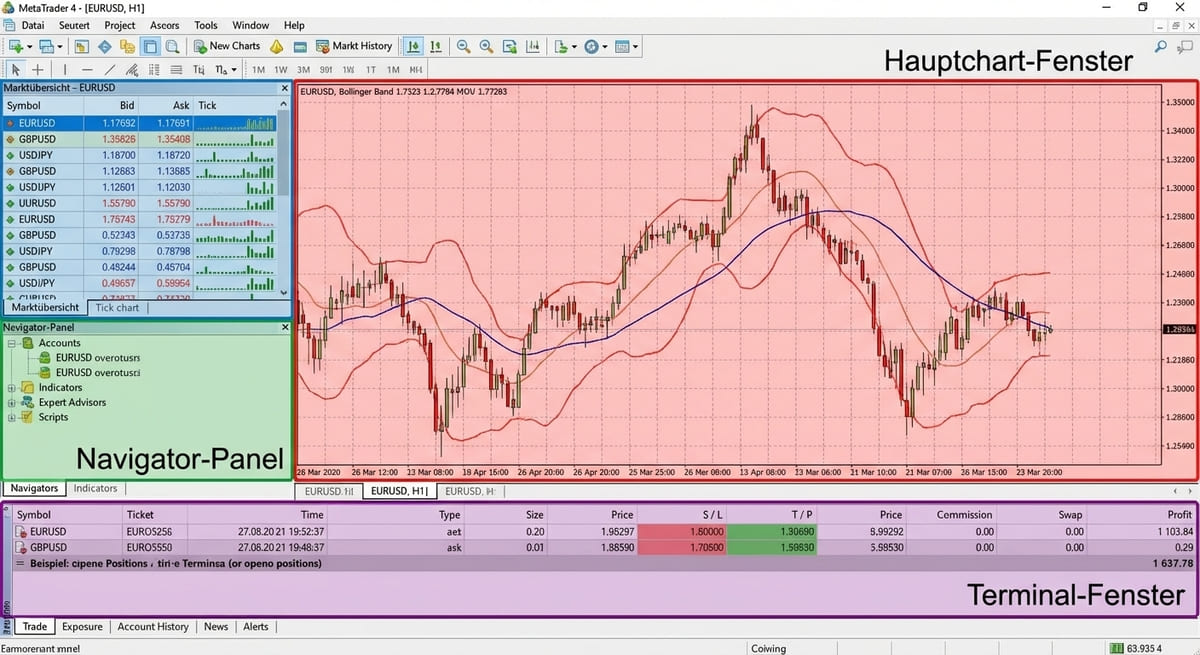
In the demo account, the platform provides a selection of trading tools. The user interface is divided into several areas: the main chart window, Market Watch, the Navigator panel and the Terminal window for open positions.
The charting system supports multiple timeframes and offers three chart types: line charts, bar charts and candlestick charts. The indicator library includes over 30 pre-installed tools for technical analysis, including moving averages, RSI, MACD and Bollinger Bands.
Order execution includes all common order types: market orders, pending orders, as well as stop-loss and take-profit levels for effective risk management.
Top features every trader should know:
- Multi-timeframe analysis for well-informed trading decisions.
- One-click trading for fast order placement.
- Advanced order types for flexible trading strategies.
- Over 30 technical indicators.
- Rule-based trading features.
- Detailed trading history.
Multi-device access and platform compatibility
The MetaTrader 4 platform is available on different devices. The Windows desktop version offers the most complete set of features and runs well on the best laptop for MetaTrader 4. The mobile versions for iOS and Android enable on-the-go trading with an interface optimised for mobile devices — smartphones and tablets.
WebTrader requires no installation and can be used directly in the browser. A major advantage is synchronisation across devices: traders can start an analysis on the desktop and continue on a smartphone while on the move. For uninterrupted automated trading, consider using the best VPS for MetaTrader 4.
Platform | Key benefits | Restrictions |
Windows desktop | Full functionality, optimal performance | Installation required |
WebTrader | No installation required, platform-independent | Limited EA functionality |
iOS/Android mobile | Trade on the go, push notifications | Reduced charting features |
Advanced functionality and tools
In addition to standard features, the platform offers advanced tools such as the Mini Terminal for enhanced order execution and detailed position management. Stealth orders allow stop-loss and take-profit levels to be stored locally only. OCO (one-cancels-the-other) orders are useful for breakout strategies.
Working with trendlines and drawing tools is an important part of technical analysis. The platform offers trend channels, Fibonacci retracements and geometric shapes. Integration with Excel allows traders to import market data in real time.
Testing trading with Expert Advisors in a demo account
Expert Advisors are programmable platform functions that can be used to implement predefined trading rules. The virtual account provides a suitable environment to test and optimise Expert Advisors. The testing process starts with backtesting, where the EA is run on historical data. After the backtest, the Expert Advisor should be tested in this environment under real market conditions.
During demo testing, parameters can be adjusted and optimised. Traders should keep in mind that order execution in a live environment may differ slightly from these results due to slippage.
EA testing process:
- Developing or selecting a trading strategy.
- Coding in MQL4 or adapting existing EAs.
- Backtesting on historical data.
- Real-time demo testing.
- Optimisation based on test results.
- Gradual use with real capital.
Differences between an MT4 demo account and a live account
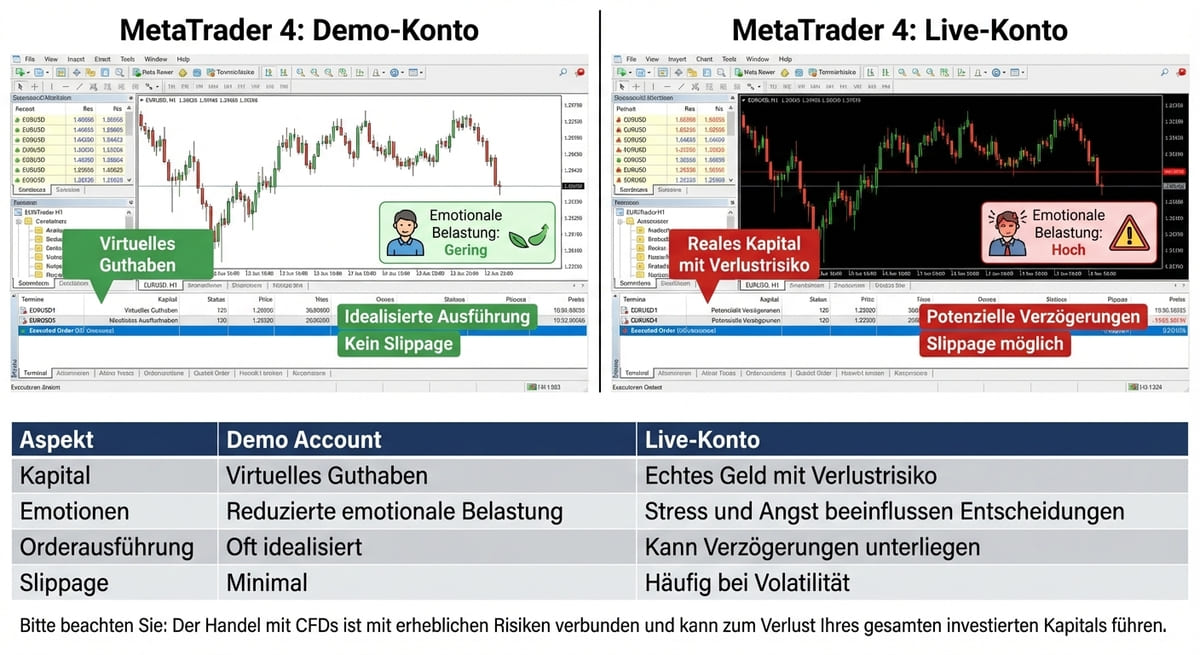
Although the MetaTrader 4 demo account replicates the real trading environment, there are key differences compared with a live account. The most obvious is using virtual capital versus real money, which has far-reaching implications for the psychological aspect. In addition, market gaps that can occur after weekends or major news, for example, are not always reflected realistically in this environment.
Slippage — the difference between the expected and actual execution price — occurs more often in live trading. In a simulated trading environment, orders are often executed under idealised conditions, while in the live market, factors such as liquidity, volatility and out-of-hours price moves play a crucial role, especially outside regular trading hours.
Margin requirements are theoretically identical, but the practical impact differs significantly. In live trading, a margin call leads to actual losses. In addition, dividend adjustments on CFD positions can cause real account movements, which are shown in a simplified or delayed way in the simulated environment.
Aspect | Demo account | Real account |
Balance | Virtual balance | Real money with a risk of loss |
Emotions | Reduced emotional pressure | Stress and fear influence decisions |
Order execution | Often idealised | May be subject to delays |
Price slippage | Minimal | Often during periods of high volatility |
Please note: Trading CFDs involves significant risks and may result in the loss of all your invested capital. Make sure you fully understand how CFDs work and that you can afford to take the high risk of losing your capital.
Structured comparison: demo vs live account
With order execution, traders experience near-instant execution in a demo account. In live trading, delays can occur, especially during high volatility. Slippage — the difference between the expected and actual execution price — is minimal in test mode, but is regularly present in real trading and can significantly affect a position’s result depending on leverage.
Rollover fees (swaps) for positions held overnight are often simplified in demo accounts. In live trading, however, these costs are real. The leverage used also affects how strongly trading costs and dividend changes on CFD shares impact the account balance, which is often only simulated to a limited extent in a demo.
Limitations of virtual funds and realistic trading conditions
Using virtual funds comes with limitations. Many demo accounts have accelerated transactions — orders are executed faster than is possible in real markets. As a result, slippage is often only partially simulated — or not simulated at all — which can lead to unrealistic expectations, especially for scalping strategies.
Market liquidity is often not represented accurately in test mode. Large market orders can affect price and cause additional slippage in live trading, which doesn’t happen in test mode. Rejected orders are another aspect that is underrepresented in test mode.
Psychological aspects: why demo trading and live trading are so different
Switching from trading with virtual capital to a live account reveals the biggest hurdle: the psychological aspect. Trading psychology plays a lesser role in test mode because no real money is at stake.
In real trading, emotions such as fear, greed and panic come into play. Emotional management becomes the central challenge. Risk behaviour changes fundamentally — in test mode, traders often take on more risk because losses have no real consequences.
Trading discipline is easy to maintain in test mode. In live trading, however, discipline requires active effort and emotional control.
Psychological pitfalls during the transition:
- Overconfidence due to demo success.
- Fear of real losses leads to hesitant trading.
- Revenge trading after losses.
- Difficulty closing positions.
- Constantly switching strategies after the first losses.
5 strategies for practising with an MT4 demo account
Making the most of this trading environment requires a structured approach. Many traders treat it as a serious training environment.
- Strategy 1: Realistic account setup — Configure your account with a virtual balance that matches the capital you will actually use. This forces you to practise realistic risk management.
- Strategy 2: Systematic trading journal — Keep a detailed journal for every trade from the start. Regularly analyse your trading history.
- Strategy 3: Focused strategy development — Focus on one or two strategies and test them extensively.
- Strategy 4: Progressive risk management training — With progressive risk management training, you can use different position sizes. In this environment, you can track changes in position size depending on different outcomes.
- Strategy 5: Time-based training — Trade in the demo at the same times you will be active in real trading.
Avoid common mistakes in demo trading
In practice, this form of trading is not always used in a realistic way. Position sizes are often chosen that don’t match the conditions planned for live trading later on.
A lack of discipline is another problem. Without an emotional component, traders often don’t stick to their strategy. The “reset syndrome” is also problematic: traders simply reset their account after losses instead of learning from mistakes.
Commonly observed mistakes when using demo accounts:
- Using position sizes that differ from later live trading conditions.
- Inconsistent application of self-defined trading rules.
- Inconsistent risk limits within individual trades.
- Restarting a demo account without evaluating previous activity.
- Frequently switching between different trading approaches.
From an MT4 demo account to live trading: the transition
Switching from a MetaTrader 4 demo account to a live account is a transition from a simulated trading environment to a market environment with real capital. While it provides access to market features under realistic conditions, live trading involves additional factors such as capital risk and emotional influences.
This environment can be used to familiarise yourself with the platform, different trading features and basic processes. Moving to a live account means that trading decisions are no longer based on virtual conditions, but on real market conditions.
When switching to live trading, aspects such as account settings, trade sizes and your personal understanding of risk are often taken into account. These elements can have a different impact in live trading than in a simulated environment.
It’s important to note that switching to live trading with real capital involves significant risks. Results from demo trading are not a guarantee of future results when trading with real capital.
Frequently asked questions about the MT4 demo account
What is a MetaTrader 4 demo account?
It’s a free trading environment with a virtual balance. It allows traders to develop and test strategies without risking real capital, using real-time market data for an authentic experience.
How do you open an MT4 demo account?
Choose a broker that supports the platform, visit their website and click “Open demo account”. After entering basic details, download the software and receive your login details by email. The process takes less than ten minutes.
How much does an MT4 demo account cost?
It’s completely free to use. There are no registration or ongoing fees. The virtual balance is provided with no financial obligation.
How long is an MT4 demo account valid for?
The validity period varies by provider — typically 30 to 90 days — although many offer unlimited use. If inactive, the account may be deactivated, but can usually be reactivated without any issues.
What is the difference between an MT4 demo account and an MT4 live account?
The main difference is virtual versus real capital. In a real account, traders are more emotionally involved, slippage and execution delays may be more pronounced, and real trading costs apply.
How much virtual balance do you get with an MT4 demo account?
The virtual balance is usually freely selectable, typically between €1,000 and €100,000. It’s recommended to choose a balance that matches your planned live capital.
Is the MT4 demo account suitable for traders who are new to the trading platform?
It can be used by people who are new to the trading platform. It lets you explore the platform’s features and observe market movements using virtual funds.
Can you test all trading strategies on an MT4 demo account?
In this simulated market environment, various trading strategies can be tested. This lets you follow processes such as placing orders and market reactions. However, certain factors — such as psychological influences or slippage — are not fully reflected in a demo environment.
How do you switch from a demo to a live account?
By opening a live account with full registration and identity verification. After making a deposit, you will receive new login details. When transitioning, start with small position sizes.
Can you also use the MT4 demo account on mobile devices?
Yes — fully usable via iOS and Android apps with all essential features: charts, order placement, position management and push notifications.
Disclaimer: The information in this article is not intended to be and does not constitute investment advice or any other form of advice or recommendation of any sort offered or endorsed by Libertex. Past performance does not guarantee future results.
Why trade with Libertex?
- Get access to a free demo account free of charge.
- Enjoy technical support from an operator 5 days a week, from 9 a.m. to 9 p.m. (Central European Standard Time).
- Use a multiplier of up to 1:30 (for retail clients).
- Operate on a platform for any device: Libertex and MetaTrader.